
Running a small online shop means that you have to wear multiple hats. You’re the buyer, the marketer, the customer service expert, and somewhere within the chaos, you’re supposed to be the SEO expert too. If you think optimising your e-commerce website for search engine visibility makes your head spin, you’re definitely not alone.
Most small businesses that we work with in Manchester tell us the same thing: they know the importance of SEO, but theydon’t know where to start. Between managing inventory, sending orders, and keeping customers happy, SEO can often fall to the bottom of the priority list.
Here’s the trust: you don’t need a huge cash influx or a team of specialists for each part of SEO to improve rankings. What you do need is a prioritised checklist that tells you exactly what you need to do, in what order, and why it matters.
By the end of this guide, you’ll have a clear roadmap to improve your online store’s visibility on Google, attract better traffic, and convert that traffic into buyers. Let’s begin.
Before we dive into the technical bits, let’s tackle the elephant in the room: Is SEO really worth your time?
The simple answer is yes, but only if you do it right.
Think about how you tend to shop online. You type something into Google, click on one of the top results, and probably never venture to the second page. This is exactly how your customers behave, too.
The first three organic results will receive more than half of all clicks. If your product pages aren’t on page one, you’re pretty much invisible to potential customers. Meanwhile, competitors investing in SEO are the ones capturing those sales.
Unlike paid ads, which stop working the moment you stop spending money, SEO builds long-term value. Every page that has been optimised correctly will continue working for you 24/7. This is the difference between renting traffic and owning it.
For a small e-commerce business specifically, SEO offers:
Businesses that we’ve worked with typically see positive traffic increases within three to six months of implementing proper SEO work. To achieve this, you need to focus on the correct things, in the correct order.
Technical SEO ensure Google can easily crawl, understand and index your website. Think of this as making sure Google can actually see your website before worrying about the way it looks.
Reason this matters: Google has confirmed that HTTPS is a ranking factor, and browsers now explicitly warn users about non-secure websites. For e-commerce sites, which handle payments, this is non-negotiable.
How to implement this: Most hosting providers offer free SSL certificates through Let’s Encrypt. Shopify automatically includes SSL. If you’re using WooCommerce, contact your host, and they can enable it with a single click. Once it is active, set up 301 redirects from HTTP to HTTPS.
Time investment: 15-30 minutes.
Why this matters: Slow websites will frustrate users and harm your rankings. A single second delay can reduce your conversions by 7%. Page speed is an important ranking factor.
Quick wins to implement:
Time investment: 2-4 hours for the initial setup; 30 minutes for monthly maintenance.
Why it matters: You can’t improve your SEO if you can’t measure the performance. These free tools will provide the data that you need to make informed SEO decisions.
For Google Search Console:
For Google Analytics:
Check these tools weekly to monitor traffic, identify issues, and spot opportunities.
Time investment: 30–45 minutes
Why this matters: Broken links lead to a poor user experience and waste Google’s “crawl budget”. This means Google spends less time indexing your important pages as it is stuck on broken ones.
Check Google Search Console under “Coverage” for errors. Common issues include:
Time investment: 1–2 hours initial audit; 30 minutes monthly
If setting up these tools feels overwhelming, our team at Pure Media Marketing specialises in e-commerce SEO for Manchester businesses. We handle all the technical setup so you can focus on running your store.
Learn more about our e-commerce SEO services
Why this matters: Schema markup enables rich snippets, those eye-catching results that show star ratings, prices, and stock status. Products with rich snippets get much higher click-through rates.
Different schema types:
Most platforms handle this through apps:
Validate your implementation using Google’s Rich Results Test tool.
Time investment: 2–3 hours initial setup; auto-applies to new products
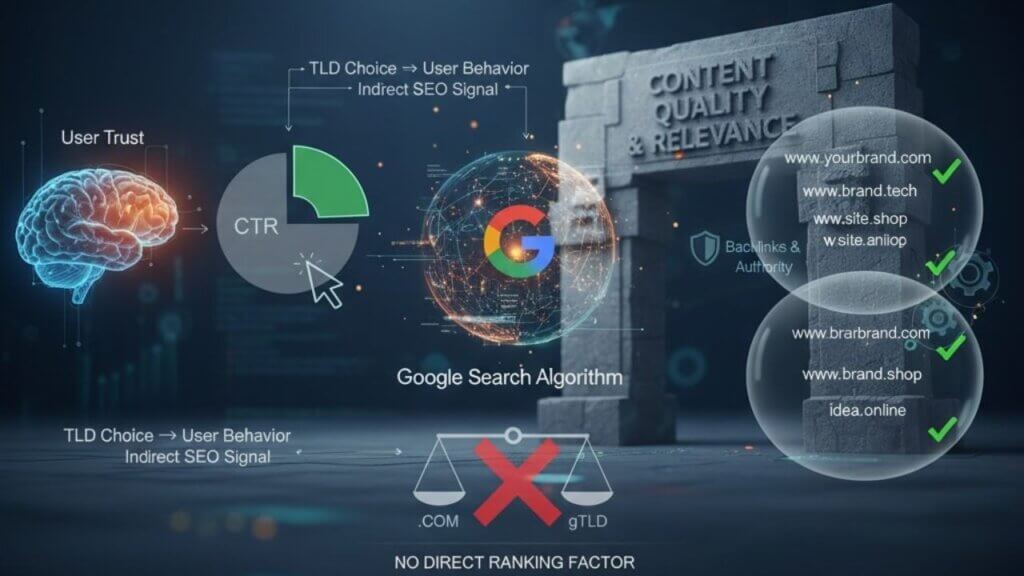
On-page SEO is all about optimising content and HTML elements on individual pages. This is where you’ll spend most of your ongoing effort.
Why this matters: Targeting the wrong keywords is the equivalent of opening a shop on a street that nobody walks on. Smart keyword research will connect your products with active buyers.
How to start:
List the products that you sell and how customers might search for them. Don’t just use the actual product names; think like someone who has never seen the site.
Use free keyword tools:
Target these keyword types:
Focus on keywords with:
Create a spreadsheet tracking your target keywords, search volume, difficulty, and which pages you’ll optimise for them.
Keyword research can feel overwhelming when you’re juggling everything else. We’ve helped dozens of Manchester e-commerce stores identify profitable keywords and build content strategies around them.
Time investment: 4–6 hours initial research; 2 hours monthly for new products
Why this matters: URLs are a direct ranking factor, and descriptive URLs receive 45% higher click-through rates than generic ones.
Good URL structure:
Bad URL structure:
Best practices:
For existing pages with traffic, set up 301 redirects if changing URLs.
Time investment: 15 minutes per product going forward
Why it matters: Title tags are crucial ranking factors. Together with meta descriptions, they determine whether people click your result or your competitor’s.
Title Tag Best Practices:
Examples:
❌ Bad: “Product Page – Your Store Name”
✓ Good: “Waterproof Hiking Boots for Men | Free UK Delivery”
Meta Description Best Practices:
✓ Good: “Shop waterproof hiking boots built for British weather. Wide fit options available. Free delivery over £50 and 60-day returns.”
Write unique title tags and meta descriptions for every product and category page. Start with best-sellers.
Time investment: 5–10 minutes per product
Why it matters: This is the most important on-page element. Unique, keyword-rich descriptions help you rank, convert visitors, and avoid duplicate content penalties.
Critical rule: Never use manufacturer descriptions. You’ll have duplicate content with every other retailer selling the same products.
Aim for 300–500 words per product using this structure:
Include your primary keyword 2–3 times naturally. Address common questions: sizing, fit, materials, and uses.
Time investment: 20–30 minutes per product
Why it matters: Category pages typically have the highest search volume. Someone searching “affordable SEO services” has clear buying intent, and these pages become your biggest traffic drivers.
Add 300–500 words of unique content to each category page (usually above or below the product grid).
Include:
Use your target keyword naturally 3–5 times throughout the content.
Creating optimised category content across your entire store can be time-intensive. Our team writes SEO-friendly product and category content that converts visitors into customers.
Explore our content services for e-commerce businesses
Time investment: 30–45 minutes per category
Why this matters: Images can rank in Google Image Search, driving additional traffic. Proper optimisation improves accessibility and helps search engines understand your pages.
Before uploading:
After uploading:
Alt text best practices:
Time investment: 3–5 minutes per product
Why it matters: Internal links distribute ranking power throughout your site, help search engines discover pages, and guide visitors to relevant content. They’re massively underutilised by small e-commerce sites.
Key linking strategies:
Best practices:
Example: Write “Browse our complete range of [waterproof hiking boots]” with “waterproof hiking boots” as the clickable link—not “Check out our collection [here].”
Time investment: Ongoing; 2–3 hours to audit existing site
Beyond product pages, creating valuable content helps you rank for informational keywords and guide potential customers through their buying journey.
Why it matters: Blog content captures people earlier in their buying journey. You’re building trust and guiding them towards your products whilst ranking for keywords that product pages can’t target.
High-value content types:
Best practices:
Don’t have time to create blog content? Our content team creates SEO-optimised blog posts that drive traffic and convert readers into customers.
See how we help Manchester e-commerce businesses
Time investment: 3–5 hours per post
Off-page SEO primarily involves building backlinks from other websites, signalling to Google that your site is trustworthy.
Ethical tactics for small businesses:
Local directories: List your business on quality directories, especially if you have a physical location.
Supplier websites: Ask brands you stock to list you as an authorised retailer.
Local partnerships: Partner with complementary businesses. A hiking boot store might partner with outdoor activity centres or walking clubs.
Product reviews: Send products to relevant bloggers and reviewers in your niche.
Guest posting: Write articles for industry blogs with a natural link back to your site.
Avoid: Buying links, spammy directories, automated link building, and excessive link exchanges.
Time investment: 3–5 hours monthly
Why it matters: Reviews are powerful E-E-A-T signals (Experience, Expertise, Authoritativeness, Trustworthiness). They create unique content, improve conversions, and enable star ratings in search results.
Implementation:
Time investment: 2 hours setup; 30 minutes weekly
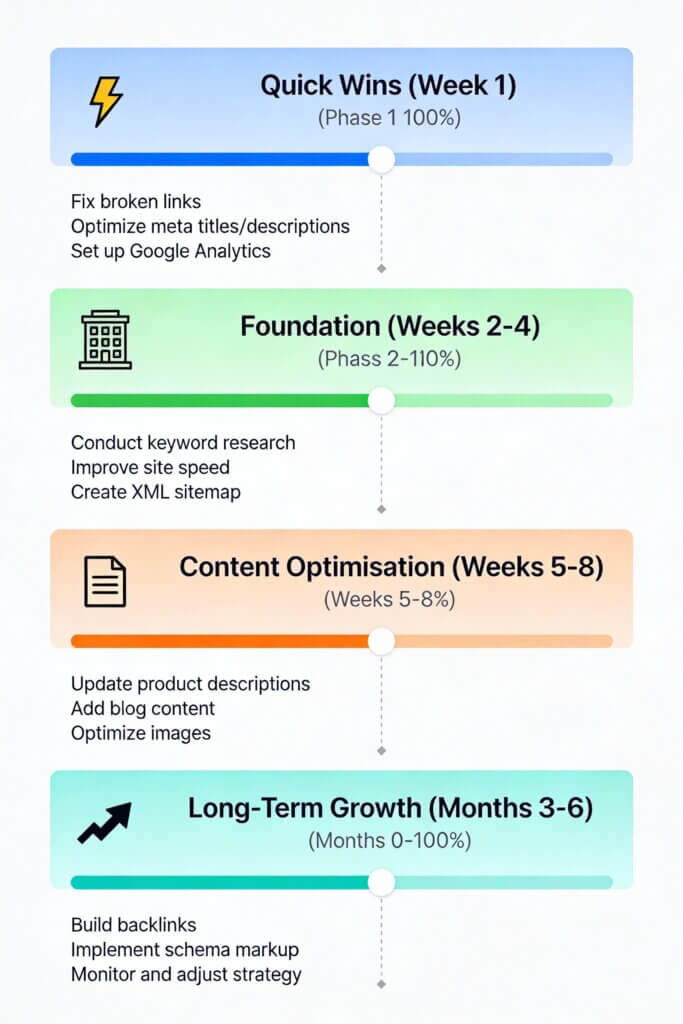
Feeling overwhelmed? Here’s how to prioritise for maximum impact with limited time.
Remember: It’s better to do a few things excellently than many things poorly.
Using manufacturer descriptions. This guarantees duplicate content issues. Always write unique descriptions.
Deleting out-of-stock products. Mark them as unavailable instead of deleting, as deleting loses ranking power and creates broken links.
Poor internal linking. Orphan pages with no incoming links won’t rank well.
Targeting impossibly competitive keywords. Focus on long-tail keywords like “vegan leather ankle boots UK” instead of “shoes.”
Neglecting mobile experience. Over 60% of e-commerce traffic is mobile. Poor mobile experience kills sales and rankings.
Keyword stuffing. Write naturally for humans first. Forced keywords harm rankings and conversions.
Ignoring site speed. Every second of delay costs sales and rankings.
At Pure Media Marketing, we specialise in e-commerce SEO for small-to-medium businesses across Manchester and the UK. We understand your unique challenges, limited budgets, time constraints, and fierce competition from larger retailers.
Our team handles the entire SEO process so you can focus on running your business: comprehensive technical audits, keyword research and strategy, product and category optimisation, content creation, link building, and monthly reporting with clear results.
We’ve helped dozens of online stores increase their organic traffic by 100–300% within the first year.
Most businesses see measurable improvements within 3–6 months, with significant results by months 6–12. SEO compounds over time, unlike paid adverts that stop when you stop paying.
You can do basic SEO yourself using this checklist. Start with technical foundations and on-page optimisation. Consider hiring professionals if you lack time, have a large catalogue, face fierce competition, or aren’t seeing results after 4–6 months.
DIY costs your time plus tools (£20–£100 monthly). Professional SEO for small e-commerce sites typically ranges from £500–£2,000 monthly, depending on scope and competition, often more cost-effective than paid advertising long-term.
No, mark them as “out of stock” instead. These pages may have built authority and rankings. Deleting loses that value. Suggest similar alternatives or allow restock notifications. If permanently discontinued, 301 redirect to similar products or the category page.
You can’t outrank Amazon for generic keywords, but you don’t need to. Focus on long-tail keywords, niche products, local SEO, superior content and expertise, exceptional customer service, and unique product combinations. Win by being a specialist, not a generalist.
If you’ve made it this far, you’re already ahead of most small e-commerce business owners. You now have a roadmap to improve your store’s visibility, attract qualified traffic, and increase sales through organic search.
Next steps:
Remember: SEO isn’t about perfection, it’s about progress. Every improvement builds cumulative value for your business. The online shops ranking at the top didn’t get there overnight. They got there through consistent, systematic optimisation over months and years.
The best time to start was yesterday. The second-best time is today.